EA-Builder
Build Expert Advisors Visually in MT5 Without Coding
Introduction: The Broken Bridge from Strategy to Expert Advisor
Every trader, regardless of their experience level, eventually reaches a crucial turning point in their career: the desire to automate their trading strategy. The benefits of transitioning from manual trading to algorithmic trading are undeniable. Automated trading provides emotionless execution, round-the-clock market monitoring 24 hours a day, 5 days a week, and the ability to apply strict, unwavering risk management rules.
However, the bridge between a profitable manual strategy and a fully functional Expert Advisor (EA) is often broken. The journey to automation is paved with technical hurdles that discourage many talented traders. Typically, a manual trader who wants to automate their ideas faces one of the following frustrating and often expensive paths:
- The Steep Learning Curve of Programming (MQL5): Learning MQL5 from scratch is a highly daunting task. It is a powerful, C++ based language, but it requires an in-depth understanding of syntax, memory management, and trading functions. For most traders, the time required to master programming concepts, handle chart events, and debug code errors far outweighs the initial benefits.
- The Freelancer Trap: To bypass learning how to code, many traders turn to hiring freelance programmers. While this seems like a straightforward solution, it is often expensive and time-consuming. Worse, the final product rarely matches the trader's original vision on the first try. Trading strategies often require endless, costly revisions.
- The AI Illusion: Recently, many traders have attempted to use artificial intelligence to generate MQL5 code. While AI tools can certainly generate scripts, they are not foolproof. They still require the user to compile the code, handle missing include files, and possess enough programming knowledge to verify if the AI-generated code actually executes the logic safely.
- The Rigidity of Web-Based Builders: Recognizing the difficulty of coding, several online EA builders have emerged. Unfortunately, many of these web-based platforms are clunky, require expensive monthly subscriptions, and lack the flexibility needed for truly complex strategies.
Furthermore, sharing and updating strategies remains a massive headache in the trading community. If a trader wants to share an updated, tweaked strategy with their friends or followers, it involves sending new files, explaining complex input parameters, and hoping the end-user installs everything correctly in their MT5 data folder. There is simply no streamlined ecosystem for this collaborative process.
The Solution: An "All-in-One" Visual Strategy Builder
To solve these deep-rooted problems within the retail trading space, we need a complete paradigm shift. Instead of treating an Expert Advisor as a static, single-purpose script, what if the Expert Advisor itself was the builder?
Enter the EA-Builder. It is a single, unified Expert Advisor that sits directly on your MetaTrader 5 chart. You never have to leave the platform, you never have to open an external website, and most importantly, you never have to touch a single line of MQL5 code.
By utilizing a highly advanced "Smart UI Layout" drawn directly onto the chart, it empowers you to create an infinite number of strategies through a fluid, interactive interface. Let's break down exactly how this tool bridges the gap between your trading intuition and automated execution by exploring its main components.
1. The Indicators Tab: Seamless Data Integration
In traditional MQL5 programming, calling an indicator requires utilizing complex functions like iMA() or iRSI(), handling handles, and ensuring data buffers are correctly copied. Instead of manually typing long lists of parameters to initialize these indicators, the EA-Builder introduces a fully visual approach.
Within the Indicators Tab, traders can easily select the technical indicators they wish to use in their strategy directly from a predefined visual list or even pull data from custom indicators already attached to the chart. You can visually configure the timeframe, period, shift, and applied price. This drastically eliminates typos, incorrect parameter inputs, and the constant, tiring back-and-forth between the MetaEditor code environment and the MetaTrader terminal.
2. The Strategy Tab: Logic that Reads Like Plain English
The beating heart of any Expert Advisor is its entry and exit logic. Traditionally, expressing this logic involves complex mathematical equations, nested IF statements, and logical operators. This is where most non-programmers give up.
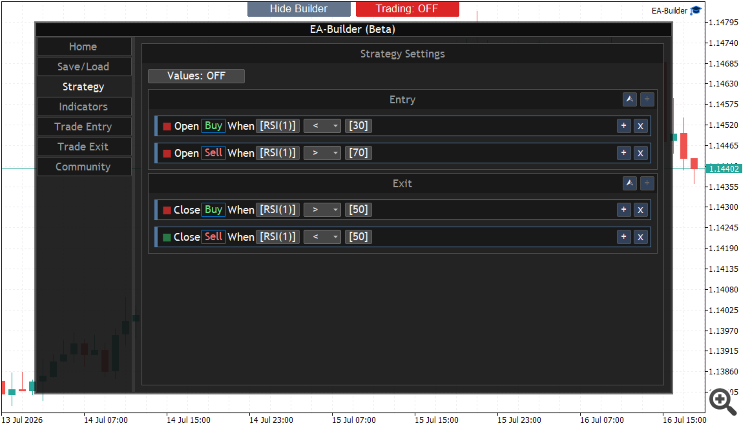
The EA-Builder completely transforms this process into an interactive, node-based experience. By using dynamic "Expression Popups," traders can construct trading conditions that read almost exactly like simple human sentences. For example, instead of writing code to check buffer arrays, you simply construct a visual block that says:
[Open] [Buy] when [RSI(1)] > [30]
Or [Close] [Sell] when [Fast MA] crosses above [Slow MA].
This visual mapping ensures that the logical flow of the strategy is intuitive, easy to read, and mathematically sound. You can combine multiple conditions using visual "AND"/"OR" groups, allowing for highly intricate strategies without ever requiring the user to compile any code.
3. Trade Management Tabs: Beyond Traditional Inputs
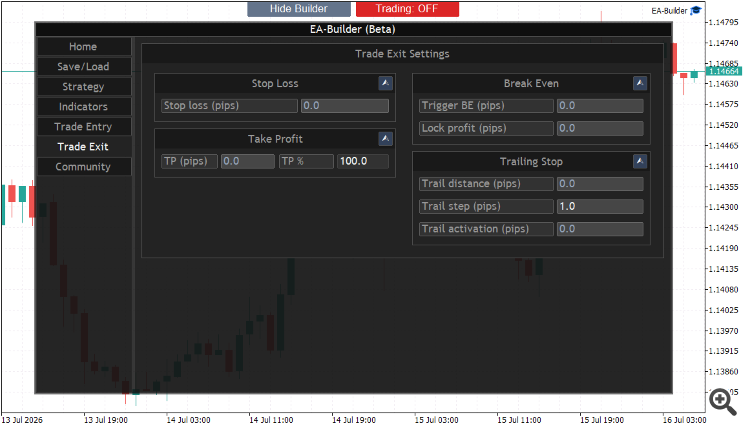
A trading strategy is only as good as its risk and money management. Most traditional Expert Advisors rely on a rigid, endlessly scrolling "Inputs" tab within the MT5 properties window. Staring at a massive list of variables like InpTakeProfit, InpStopLoss, and InpTrailingStop can be overwhelming and highly confusing, often leading to costly input errors.
The EA-Builder solves this limitation by providing dedicated, beautifully designed visual tabs for Trade Entry and Trade Exit directly on the chart. Here, users can easily configure their desired lot sizing methodology (fixed lot, percentage of equity, etc.), dynamic take profit levels, advanced stop loss settings, trailing stops, and breakeven functions.
Furthermore, you can define daily trading limits, max open positions, and trading hours in a clean, categorized visual environment. This layout ensures that crucial risk parameters are always clear, accessible, and impossible to misconfigure.
4. Save & Load: The Foundation of Strategy Sharing
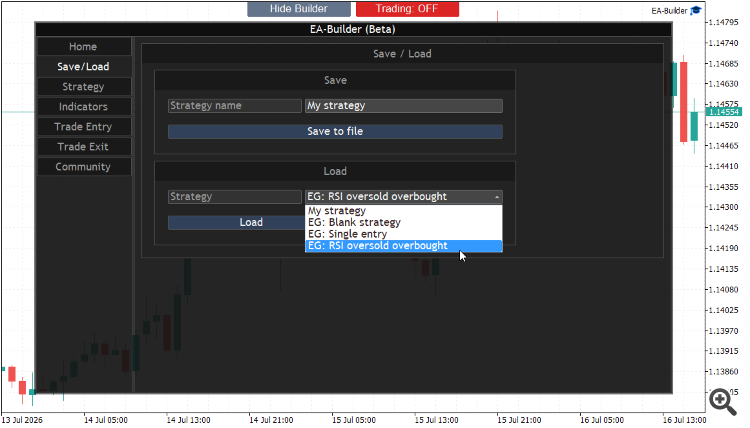
One of the biggest flaws of using external websites to build EAs is that you constantly have to download new executable files every time you make a minor tweak to your strategy.
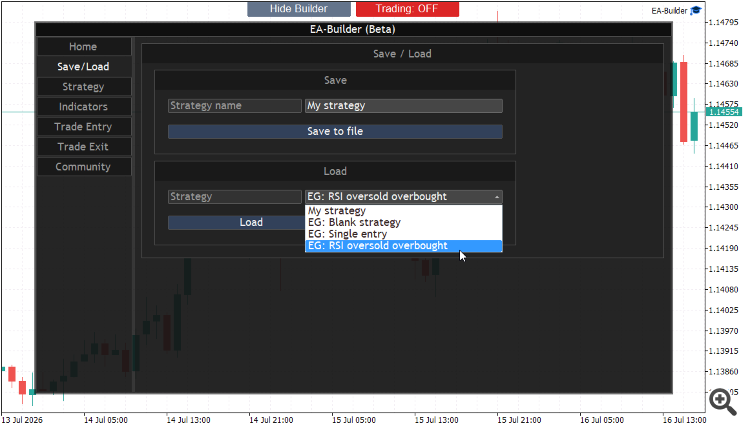
Operating entirely without an external website or complex file structures, the EA-Builder features a highly robust, built-in state management system. Traders can save limitless strategies internally as lightweight JSON presets. You can save your current logic, name it, and load it instantly with a single click at any time in the future.
This incredible flexibility means you can switch between a high-frequency scalping strategy during the London session and a conservative swing-trading strategy during the Asian session on the fly, directly from the chart window, without ever touching your MT5 data folder or recompiling an EA.
5. Seamless Backtesting and Optimization
One of the most critical phases in algorithmic trading is backtesting. An EA builder is useless if you cannot rigorously test your creations against historical data. Because the EA-Builder operates natively within the MetaTrader 5 ecosystem, it fully leverages the power of the MT5 Strategy Tester. Once you have constructed your visual logic, you can immediately run it through the strategy tester to see how it performs across years of historical tick data.
Moreover, when you configure your variables within the visual tabs—such as indicator periods or stop-loss distances—you can easily expose them to the MT5 optimizer. This allows you to run genetic algorithms to find the most profitable inputs for your strategy, bridging the gap between visual design and professional-grade quantitative analysis.
6. The Future Vision: The Community Ecosystem
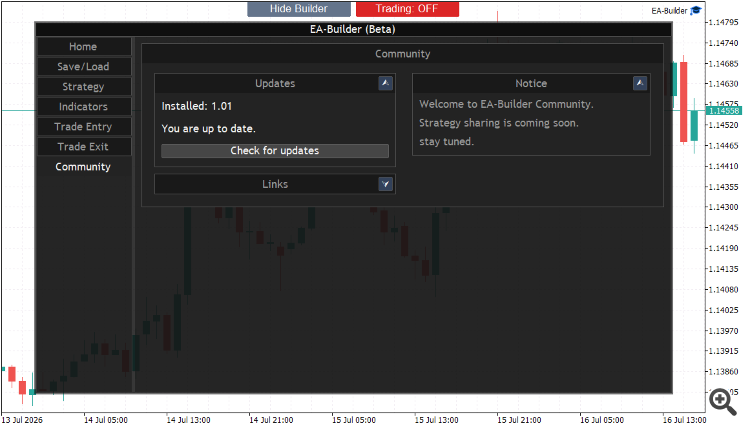
The ultimate goal of simplifying EA creation is to revolutionize how traders collaborate and share knowledge globally. Imagine a future where sharing a profitable strategy doesn't require sending executable files, explaining installation paths, or pushing manual updates.
Through a planned integrated community ecosystem, a professional trader could seamlessly share their EA-Builder strategy directly within the interface. Beginners could browse a marketplace of ideas, test them, and apply successful strategies directly from their own chart. It transforms the solitary act of algorithmic trading into a dynamic, community-driven ecosystem where ideas flow freely and execution is instantaneous.
7. Who Can Benefit From This Paradigm Shift?
The beauty of a no-code visual builder lies in its universal appeal. Beginner traders can finally bring their ideas to life without feeling overwhelmed by syntax errors and compilation bugs. It acts as an incredible educational tool, helping them understand the strict rules required to build a profitable system.
Professional traders and fund managers, on the other hand, can use it for rapid prototyping. Instead of spending weeks coding a new theory to see if it holds water, they can construct the logic visually in minutes, backtest it instantly, and determine if the core concept is worth pursuing further. It drastically reduces the time-to-market for new trading strategies.
The Road Ahead: Continuous Evolution
While the EA-Builder represents a significant leap forward for retail algorithmic trading, we fully acknowledge that the journey is far from over. Compressing the infinite possibilities of the financial markets and countless trading strategies into a finite, user-friendly graphical interface is an immense technical challenge that requires continuous development and refinement.
However, we are confidently on the right path. As more traders adopt the tool, test its limits in live market conditions, and share their valuable feedback and feature suggestions with us, the builder will continuously evolve to achieve maximum flexibility, power, and ease of use.
Conclusion: Redefining Strategy Development
The era of struggling with code syntax, paying exorbitant fees for endless freelancer revisions, or wrestling with overly complex web platforms is finally coming to an end. By utilizing an all-in-one visual strategy builder that lives directly on your MetaTrader 5 chart, you regain full, uncompromised control over your trading ideas.
Your Trading Advantage: You gain the absolute flexibility to test infinite strategies instantly, the safety and reliability of a robust underlying execution engine, and the freedom to manage and share your methods seamlessly. The EA-Builder isn't just another trading tool; it is the missing link between a trader's intuition and automated execution, empowering absolutely anyone to turn their ideas into reality.